




Creating a good presentation takes more than putting text on slides. You need a clear structure, a clean layout, and a flow that helps your audience understand the point quickly. That is where Dokie AI can be useful.
Dokie AI is an AI presentation maker that helps users turn ideas, notes, or topics into ready-to-edit PPT slides. Instead of spending hours planning the outline, arranging sections, and fixing basic layouts, you can use Dokie AI to generate a complete first draft and then polish it based on your own needs.
In this Dokie AI review, we will look at what Dokie AI does well, who it is best for, how its PPT templates work, and whether it is a good choice compared with other AI presentation tools.
What Is Dokie AI?

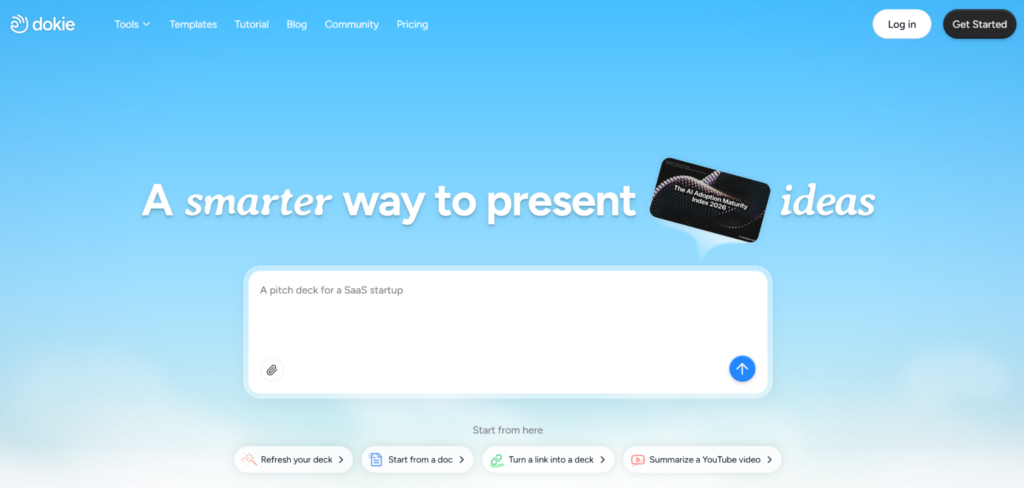
Dokie AI is an AI PPT maker designed to help users create presentations faster. It can generate slides from a topic, prompt, document, or other input, depending on the workflow you choose.
The main value of Dokie AI is not only that it creates slides quickly. Its bigger strength is that it helps organize information into a clear presentation structure. This matters a lot for work decks, client reports, pitch decks, marketing plans, and weekly updates.
Many AI slide tools can create nice-looking pages, but the result often feels more like a web page or visual note. Dokie AI focuses more on traditional PPT-style presentations, which makes it easier to use in real meetings, client calls, business reviews, and office workflows.
Key Features of Dokie AI
1. AI Presentation Generation
Dokie AI can help you create a presentation from a simple topic or prompt. For example, you can enter a topic like “Q2 Marketing Performance Report” or “AI Tools for Small Business,” and the tool can generate a slide deck with a logical structure.
This is helpful when you have a rough idea but do not want to spend time building the outline manually.
A typical deck may include:
- Title slide
- Agenda
- Background or problem
- Key insights
- Data or main points
- Recommendations
- Next steps
- Summary
This kind of structure is useful for business users because it feels closer to how real workplace presentations are built.
2. Many PPT Templates
One of Dokie AI’s important advantages is that it offers many PPT templates. These templates help users start with a style and structure that already fits their use case.
From the template library, users can browse different categories, including:
This makes it easier to find a template based on the type of presentation you want to create.
For example, if you are preparing a company report, you can start from the Business category. If you are building a startup fundraising deck, the Pitch Deck category is more suitable. If you need to explain data, processes, or comparisons, the Infographics category can help you present information in a more visual way.
This template system is useful because not every presentation has the same purpose. A marketing campaign report should not look the same as a medical training deck or a personal introduction deck. Dokie AI gives users more options based on real scenarios.
3. Business Presentation Templates
The Business template category is likely one of the most useful parts of Dokie AI for office users.
Business presentations often need to be clear, direct, and easy to present. They are not only about design. They also need to support decision-making.
Business templates can be used for:
- Weekly reports
- Monthly reports
- Strategy plans
- Market analysis
- Project updates
- Client presentations
- Company introductions
- Performance reviews
For these use cases, Dokie AI’s structure-first approach is helpful. It gives users a clear starting point, then users can adjust the content, add data, and polish the final slides.
4. Education Templates
The Education category is useful for teachers, students, trainers, and course creators.
Education presentations usually need to explain concepts step by step. They should be easy to follow and not too crowded. Dokie AI’s education templates can help users create lesson slides, class reports, training materials, and academic presentations.
Possible use cases include:
- Classroom lessons
- Course outlines
- Student projects
- Training decks
- Research presentations
- Workshop materials
For users who need to create teaching content often, templates can save a lot of time.
5. Marketing Templates
The Marketing category is useful for marketers, growth teams, agencies, and founders.
Marketing presentations often need to combine strategy, data, campaign results, audience insights, and next-step plans. Dokie AI can help turn messy campaign notes into a clearer deck structure.
Marketing templates can be used for:
- Campaign reports
- Social media plans
- SEO reports
- Influencer marketing plans
- Brand strategy decks
- Content marketing plans
- Product launch plans
- Growth experiments
For marketing teams, speed matters. You may need to prepare reports every week or every month. Dokie AI can reduce the time spent on formatting and basic structure, so you can focus more on insights and strategy.
6. Medical Templates
The Medical category is useful for healthcare-related presentations, training materials, medical education, and health reports.
Medical presentations often need a clean and trustworthy style. They should avoid too much visual noise. A good medical deck needs to present information clearly and carefully.
Possible use cases include:
- Medical training slides
- Healthcare reports
- Patient education materials
- Research summaries
- Hospital presentations
- Health awareness decks
Of course, users should still review all medical content carefully. AI can help with structure and formatting, but expert review is still needed for accuracy.
7. Technology Templates
The Technology category fits SaaS teams, product managers, developers, startup founders, and tech marketers.
Technology presentations often need to explain complex ideas in a simple way. A good tech deck should help the audience understand the product, system, roadmap, or market opportunity quickly.
Technology templates can be used for:
- Product demos
- SaaS pitch decks
- AI product introductions
- Technical reports
- Product roadmaps
- Software launch plans
- Market trend analysis
- Internal product updates
For AI and SaaS teams, Dokie AI can be especially helpful because many presentations need to be created quickly for investors, partners, customers, or internal teams.
8. Pitch Deck Templates
The Pitch Deck category is useful for startup founders, business owners, and teams preparing fundraising or sales presentations.
Pitch decks need a strong story. They usually need to explain the problem, solution, market, business model, traction, team, and future plan. If the structure is weak, even a good business idea can look confusing.
Dokie AI’s pitch deck templates can help users start with a more complete framework.
A typical pitch deck may include:
- Problem
- Solution
- Product
- Market size
- Business model
- Traction
- Competition
- Go-to-market plan
- Team
- Financials
- Ask
This is useful for founders who do not want to start from a blank slide. It also helps make sure important sections are not missed.
9. About Me Templates
The About Me category is useful for personal introductions, portfolios, resumes, student introductions, creator profiles, and personal branding decks.
Not every presentation is for a company. Sometimes you need to introduce yourself in a clear and professional way.
About Me templates can be used for:
- Personal portfolio decks
- Student introduction slides
- Job interview presentations
- Creator media kits
- Personal branding decks
- Team member introductions
This category is useful because personal presentations need a different tone. They should feel more human, but still look clean and organized.
10. Infographics Templates
The Infographics category helps users turn information into visual slides.
Infographic slides are useful when you need to explain data, processes, comparisons, timelines, or key facts. Instead of using long paragraphs, you can present information in a more visual and easy-to-read way.
Infographics templates can be used for:
- Process slides
- Timeline slides
- Comparison slides
- Data summary slides
- Workflow slides
- Research findings
- Step-by-step guides
- Business framework slides
This is helpful for users who want their slides to look more visual without designing everything from scratch.
What Makes Dokie AI Different?
Dokie AI stands out because it focuses on practical presentation workflows. It is not only trying to create beautiful slides. It is trying to help users create decks that can actually be used in work, study, marketing, and business settings.
The main difference is its focus on structure.
Many AI presentation tools create slides that look modern, but users may still need to spend a lot of time reorganizing the deck. Dokie AI feels more useful when your goal is to create a traditional PPT that can be presented in a meeting or exported for business use.
This makes it a good fit for:
- Office workers
- Marketers
- Founders
- Students
- Teachers
- Consultants
- Agencies
- Product teams
- Sales teams
Pros and Cons of Dokie AI
Pros
1. Fast first draft generation
Dokie AI helps users move from a rough idea to a complete presentation draft quickly. This is useful when you need to prepare slides under time pressure.
2. Clear presentation structure
The generated decks usually follow a logical flow, which is important for business and work presentations.
3. Many template categories
Dokie AI offers useful PPT template categories, including Business, Education, Marketing, Medical, Technology, Pitch Deck, About Me, and Infographics.
4. Good for office use
Dokie AI is especially useful for reports, strategy decks, client presentations, and team updates.
5. Easy to edit
The generated slides are not meant to be final forever. Users can edit, polish, and adjust them based on their real needs.
6. Useful for different scenarios
From pitch decks to education slides, Dokie AI supports many common presentation needs.
Cons
1. Important slides still need human review
Like most AI tools, Dokie AI can create a strong draft, but users should still check facts, data, tone, and final design.
2. Design may still need polishing for high-stakes decks
For investor decks, major client proposals, or brand-level presentations, users may still want to polish the visuals manually.
3. AI output depends on input quality
The better your prompt or source content, the better the deck will be. A vague prompt may lead to a more general result.
Who Should Use Dokie AI?
Dokie AI is a good choice for people who create presentations often and want to save time.
It is especially useful for:
Business Teams
Business users can use Dokie AI for reports, meeting decks, strategy plans, and internal updates.
Marketers
Marketing teams can use it for campaign reports, SEO summaries, influencer plans, launch decks, and growth strategies.
Founders
Startup founders can use Dokie AI to create pitch decks, product decks, investor updates, and market analysis presentations.
Students and Teachers
Education users can create class presentations, project reports, lesson slides, and research summaries.
Consultants and Agencies
Consultants and agencies can use Dokie AI to create client decks, proposal slides, audit reports, and strategy presentations faster.
Job Seekers and Creators
The About Me templates are helpful for people who need portfolio decks, personal introductions, or media kits.
Dokie AI Template Categories Overview
| Template Category | Best For |
| All | Browsing all available PPT templates |
| Business | Reports, strategy decks, company updates, client presentations |
| Education | Lessons, student projects, training materials, research slides |
| Marketing | Campaign reports, SEO plans, growth decks, brand strategy |
| Medical | Healthcare education, medical reports, training slides |
| Technology | SaaS decks, AI product slides, product roadmaps, tech reports |
| Pitch Deck | Startup fundraising, business proposals, investor presentations |
| About Me | Personal introductions, portfolios, resumes, creator profiles |
| Infographics | Data summaries, timelines, workflows, process slides |
Dokie AI for Business Decks
Dokie AI is especially strong for business decks because it understands that a presentation needs a flow.
A business deck usually needs to answer questions like:
- What is the topic?
- Why does it matter?
- What are the key findings?
- What should we do next?
- What decision needs to be made?
Dokie AI can help users organize these ideas into a deck that is easier to present. This is useful for weekly reports, monthly reports, campaign reviews, product updates, and client meetings.
For many business users, the hardest part is not designing a slide. The hardest part is deciding what goes first, what comes next, and how to make the whole deck feel clear. Dokie AI helps solve that problem.
Dokie AI for Marketing Presentations
Marketing teams often need to create many presentations. These can include SEO reports, social media plans, paid ads reviews, influencer marketing updates, and campaign summaries.
Dokie AI can help marketers turn messy notes into a clean deck. For example, instead of starting with a blank PPT, a marketer can enter the campaign topic and ask Dokie AI to create a deck with campaign goals, audience insights, channel strategy, performance results, and next steps.
This is useful because marketing presentations need both structure and storytelling. Dokie AI gives users a base, and then marketers can add real data, screenshots, charts, and insights.
Dokie AI for Pitch Decks
Pitch decks are one of the most important use cases for Dokie AI.
A startup pitch deck needs to be simple, clear, and persuasive. Founders often know their business well, but they may struggle to turn that knowledge into a clean investor story.
Dokie AI’s Pitch Deck templates can help founders build a first version faster. Users can then edit the deck with real traction numbers, product screenshots, financial data, and market research.
This is not a replacement for founder thinking, but it is a useful starting point.
Dokie AI vs. Other AI Presentation Makers
Compared with some AI presentation tools, Dokie AI feels more focused on traditional PPT needs. Some tools create beautiful web-style presentations, but they may not always fit normal workplace presentation habits.
Dokie AI is a better fit when you want:
- A clear PPT-style deck
- A structured business presentation
- A fast first draft
- A deck that can be edited and polished
- Templates for real use cases
- Presentations for office, marketing, education, or startup work
It may not be the best choice if you only want a very artistic visual deck or a highly customized brand design from the first draft. But for most practical presentation needs, Dokie AI is a strong option.
Final Verdict: Is Dokie AI Worth Trying?
Yes, Dokie AI is worth trying if you often create presentations and want to save time on structure, layout, and first-draft creation.
Its biggest strength is that it helps users create practical, organized, and presentation-ready decks. The template library also makes it easier to start from the right scenario, whether you need a business report, marketing deck, medical presentation, technology deck, pitch deck, personal introduction, or infographic-style slide deck.
Dokie AI is not a magic tool that removes all editing. You still need to review the content, add your own data, and polish important slides. But it can greatly reduce the time spent starting from a blank page.
For business users, marketers, founders, teachers, students, and consultants, Dokie AI is a practical AI PPT maker that can make presentation creation much faster and easier.
FAQs
1. What is Dokie AI?
Dokie AI is an AI PPT maker that helps users create presentations from topics, prompts, notes, or documents. It focuses on structured, editable, and practical presentation decks.
2. Does Dokie AI offer PPT templates?
Yes. Dokie AI offers many PPT templates across categories such as Business, Education, Marketing, Medical, Technology, Pitch Deck, About Me, and Infographics.
3. Is Dokie AI good for business presentations?
Yes. Dokie AI is especially useful for business presentations, including weekly reports, monthly reports, strategy decks, client presentations, and project updates.
4. Can I use Dokie AI for pitch decks?
Yes. Dokie AI has Pitch Deck templates that can help startup founders create fundraising decks, business proposals, and investor presentations faster.
5. Who should use Dokie AI?
Dokie AI is suitable for business teams, marketers, founders, students, teachers, consultants, agencies, and anyone who needs to create presentations often.


