





Noone can underestimate the sensitivity of data safety. Outlook mailbox data must be secured and protected. This data comprises vital business communication. It contains important attachments as well as contacts. Creating data backup is extremely important. The golden rule “prevent data first” must be followed. Creating a reliable OST backup file ensures that our sensitive email messages and attachments remain safe and recoverable.
Let’s examine the available file formats. First start with the Offline Storage Table. It is designed for caching. It is a temporary copy of the mailbox. This file format lacks robust backup features. It is more prone to corruption. Also, an .ost file doesn’t guarantee folder integrity. In nutshell, we must say “NO” to this file format. Is PST file format okay for storage? The answer is “YES” for this query. Firstly, it is portable. Secondly, it promises long-term data safety. Thirdly, it offers better manageability of mailbox folders. Are you still unsure about “How to Backup Outlook Emails Easily.” Look no further!
This guide will let you know everything. It will shed light on different ways to perform such task and also unearth an OST to PST converter tool.
Methods to Backup OST File:
Outlook also provides some built-in manual options. Check the below guide:
Method 1: Copy Outlook OST Directly:
- Shutdown the Outlook
- Then locate the OST file
- Navigate to the File
- Go to Account Settings
- Browse Data Files
- Then Copy the OST to the external drive
Method 2: Utilizing the Import/Export Wizard:
This feature prompts user to export data to a new PST. Follow the below guide:
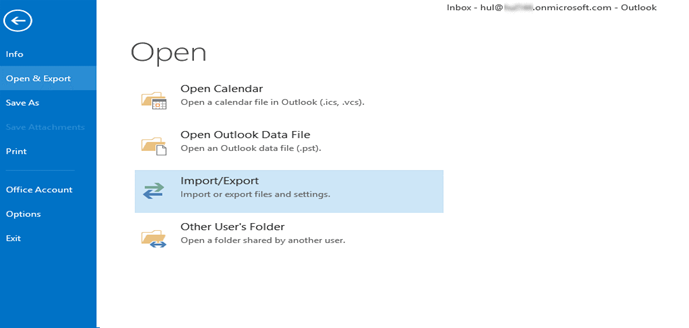
- Navigate to the File
- Then click Open & Export
- After this press Import/Export option

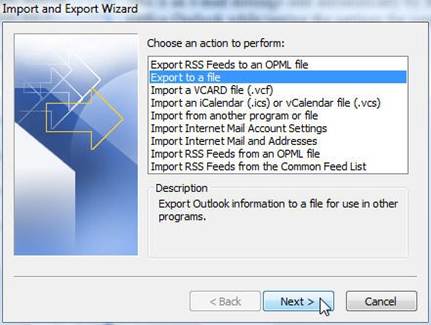
- Now the Wizard will ask to choose action
- Select Export to a file option
- Then click on the Next button

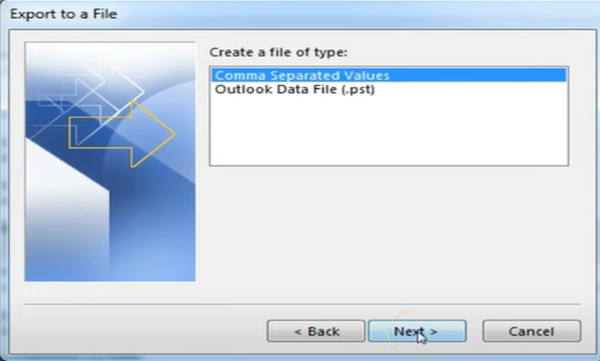
- From the dropdown options, choose ‘Outlook Data File (.pst).’
- After this press ‘Next’.

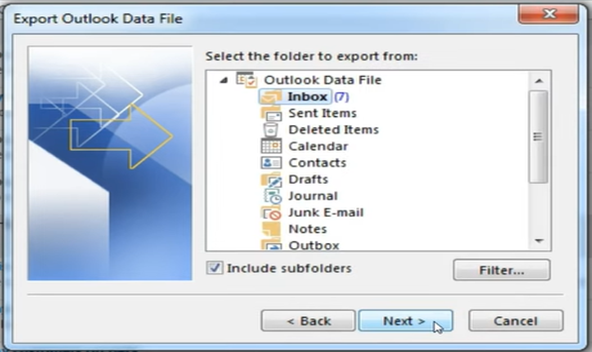
- Now choose the email message folders.
- Check the Include Subfolders options as well. Then hit Next.

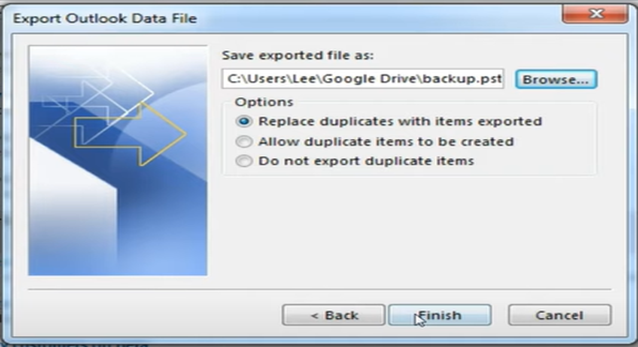
- Provide backup file location after browsing. Check “Replace duplicate with items exported” option. Hit on the Next button.

Method 3: Utilizing Drag & Drop Method
Outlook users can take the backup of their emails using this method. But this method is recommended for small mailbox. Follow the below guide:
- Create a fresh, blank PST file
- Select the.ost file
- Drop selected folders
Shortcomings of the Manual Methods:
There are certain drawbacks of the above-discussed approaches. Some of them are discussed below:
Manual ways only work on active Outlook profiles
- They involve complex steps
- They offer no option for deleted mailboxes
- They require a degree of technical knowledge
- Manual ways consume loads of productive hours
What is the Smartest Approach?
There are users who manage critical email data and value reliability. Such users generally have large mailboxes. They must work on a professional OST to PST converter tool. Such software offers safety as well as accuracy. Before zeroing on any software, a user must evaluate its efficiency. The user must first try the trial version of such software. There are many free converter tools available in the market. Stellar Converter for OSTis one of them. This tool can work without Outlook. It is not dependent on the mail server as well.
Other features of Stellar Converter for OST:
- Free trial version available
- Friendly GUI
- Can recover folders from an oversized OST
- Maintain folder hierarchy
- Can back up emails from inaccessible sOST
- Quick conversion saves loads of productive hours
- Advanced filter option for selective targeting
- Can recover deleted mailbox items
- Ability to extract all email messages, attachments, etc.
Conclusion:
The above analysis investigates why backup OST file. It advocates why email backup is crucial. The post has explored 3 manual methods. But these ways are not foolproof. They have certain limitations. These methods involve complex steps. They also pose risk of the data loss. Such a situation demands a professional software. Using an OST to PST converter tool is quite beneficial. It ensures data integrity. Such software utilizes advanced algorithms. IT admins prefer using tools like Stellar Converter for OST. It is user friendly and fast. It is reliable and convenient. It can recover data from an inaccessible OST.


