


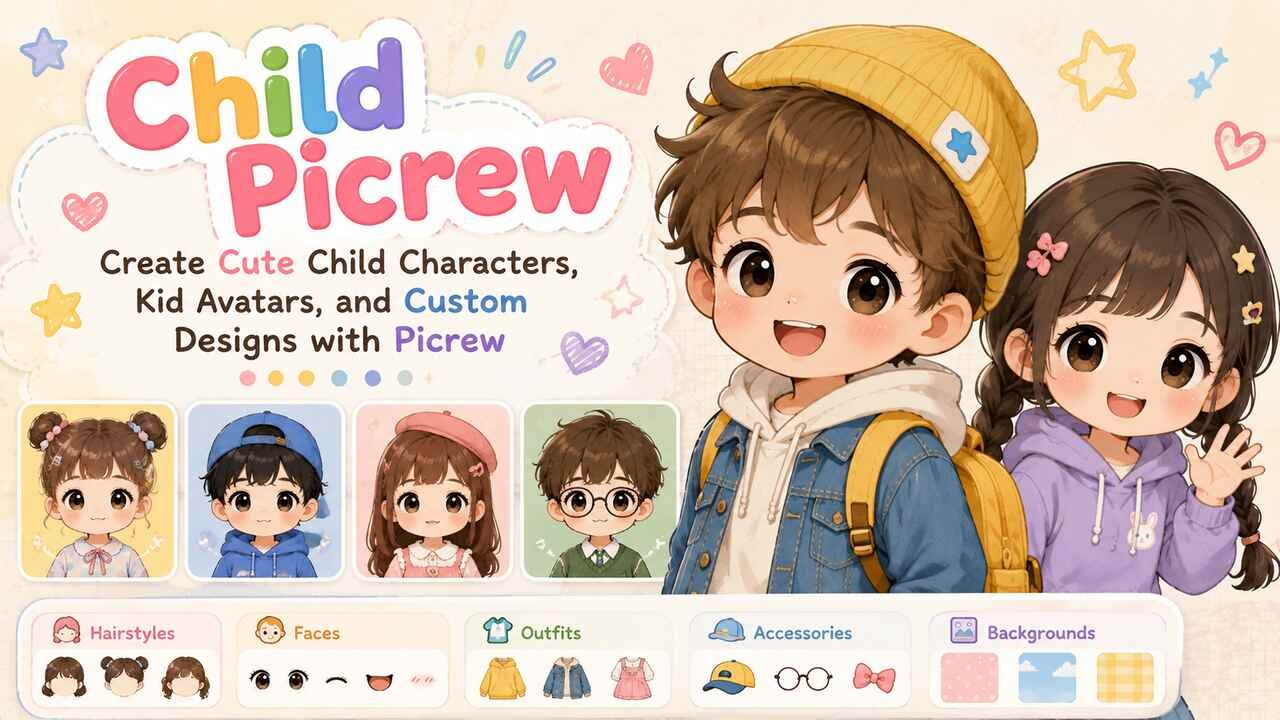


A child Picrew is a character or avatar created with a Picrew image maker that offers childlike facial features, hairstyles, clothing, expressions, accessories, and other customization options. People commonly use these makers to visualize fictional children, create family characters, design younger versions of original characters, or make profile-style artwork without drawing everything manually. Choosing the right maker and adjusting its available features carefully can help you produce a child character that fits a particular story, appearance, age range, or artistic style.
Picrew offers many independently created image makers, so the available customization choices can vary significantly from one maker to another. Some focus on cute cartoon children, while others provide fantasy characters, family portraits, anime-inspired designs, or general character creators that can also produce younger-looking characters. Understanding how to search, customize, save, and appropriately use these creations makes the process easier and helps users respect each artist’s individual usage rules.
Find a Child Picrew Maker That Matches Your Character
Start by finding a Picrew maker whose artwork and customization options match the child character you want to create. A useful maker should provide appropriate facial proportions, hairstyles, expressions, clothing, and accessories rather than simply offering an adult character with limited customization. Looking through several makers before choosing one can save time because every Picrew creator determines the components available in their own image maker.
Consider the character’s approximate age, visual style, hair, clothing, and overall personality while comparing available makers. A cartoon-style child creator may work well for a playful family character, while an anime-inspired maker may be more suitable for an original character used in a fictional setting. Fantasy makers can provide additional elements such as unusual ears, magical accessories, crowns, wings, or fictional clothing when realism is not the goal.
Search results may also change as creators publish, update, restrict, or remove their makers. As a result, a maker recommended in an older post may no longer be available. Searching by descriptive terms such as kid character creator, child avatar maker, family Picrew, young character Picrew, or chibi child creator can provide more useful options than relying on one specific maker.
| Child Picrew Style | Useful Features | Best Suited For | Common Design Elements |
|---|---|---|---|
| Cute cartoon | Simple faces, colorful clothes, large expressions | Casual avatars and family characters | Rounded faces, bright colors, playful accessories |
| Anime-inspired | Detailed hair, eyes, expressions | Original characters and fictional stories | Large eyes, layered hair, stylized clothing |
| Chibi | Small body proportions, oversized head | Cute character designs | Simplified body, expressive face, colorful outfits |
| Fantasy | Magical clothing and unusual features | Fantasy children and role-playing characters | Wings, horns, crowns, fantasy ears |
| Family portrait | Multiple characters or coordinated designs | Fictional or family-inspired groups | Matching clothes, varied hairstyles, accessories |
| General character maker | Broad customization | Flexible character creation | Multiple faces, hair colors, outfits, backgrounds |
Choose an Age-Appropriate Character Design
Build the character around visual features that communicate the intended age range without relying on a single detail. Facial proportions, hairstyle, clothing, body proportions, and accessories work together to establish whether a character appears to be a young child, older child, or teenager. Because Picrew makers use different art styles, the same design choice can produce different age impressions across different creators.
Younger-looking characters are often represented with softer facial shapes, simplified clothing, smaller bodies, and more playful accessories. Older child characters may have more detailed hairstyles, layered outfits, glasses, hats, backpacks, or other features associated with school-age characters. The available choices depend entirely on the maker, so users sometimes need to try several combinations before reaching the intended appearance.
Age presentation also matters when creating characters for stories, games, family illustrations, or role-playing settings. A character described as eight years old should visually fit that role if age is important to the story. Consistent visual decisions make the final avatar easier for viewers to understand and reduce confusion when several characters of different ages appear together.
Customize the Child Picrew Face and Skin Appearance
Begin facial customization by selecting the face shape and skin appearance that best represent the character. Picrew makers commonly organize facial components into selectable layers, allowing users to change features individually. Depending on the maker, available options may include face shapes, skin tones, freckles, blush, birthmarks, facial lines, and other decorative details.
Skin-tone variety differs substantially between image makers because individual artists create their own selection of assets. A maker with a broad range of tones may be more suitable when representing a specific character or creating several children with distinct appearances. Freckles, blush, moles, and similar options can add individuality, but they should support the overall design rather than become the only recognizable characteristic.
Facial appearance establishes the foundation for the remaining design choices. Hair, eyes, expressions, clothing, and accessories usually appear more coherent when they complement the selected face. If a maker cannot represent the appearance you need, switching to another maker is generally more effective than forcing unsuitable options into the design.
Select Eyes and Expressions That Show Personality
Choose eyes and facial expressions according to the personality or situation you want the child Picrew to communicate. Eyes are especially prominent in cartoon, anime, and chibi art, where relatively small differences in shape can change the character’s perceived mood. A cheerful expression can make a character appear energetic and approachable, while a neutral or thoughtful expression may work better for a quiet fictional character.
Many makers separate eyes, eyebrows, and mouths into different controls. This arrangement allows combinations such as raised eyebrows with a smile, lowered eyebrows with a neutral mouth, or wide eyes with an excited expression. Eye colors may also be adjustable independently, although some makers provide only a limited palette based on the artist’s chosen aesthetic.
Expression becomes particularly useful when creating several versions of the same character. A writer might create a happy version, worried version, and surprised version to visualize different scenes. Maintaining the same hairstyle, clothing, and major facial features while changing the expression can preserve character recognition across those variations.
Pick a Hairstyle and Hair Color for the Character
Select a hairstyle that supports the child’s appearance, personality, and fictional setting. Hair is one of the most recognizable parts of an avatar, and Picrew makers may divide it into several layers such as bangs, side hair, back hair, ponytails, buns, or additional strands. Combining these components can produce significantly more variation than selecting a single fixed hairstyle.
Hair color options depend on the creator. Natural colors such as black, brown, blonde, and red are common, while fantasy-oriented makers may also provide pink, blue, green, purple, white, or multicolored hair. Some creators allow the front and back portions to use different colors, creating possibilities for highlights or stylized character designs.
Consider consistency when recreating an established original character. If the character has curly brown hair, for example, prioritize makers that can approximate both the texture and color. Exact matches are not always possible because Picrew works with predetermined artwork rather than freehand character editing. In those situations, selecting the closest recognizable combination is usually the most practical approach.
Add Clothing That Fits the Child Picrew
Dress the character using clothing that suits the intended age, setting, season, and personality. Available clothing can range from simple T-shirts and sweaters to school-inspired outfits, jackets, dresses, costumes, fantasy garments, and themed clothing. The maker’s artistic theme usually determines which wardrobe options are available.
Color can further distinguish one outfit from another. A bright sweater may support an energetic character, while muted colors can create a calmer visual impression. When designing siblings or a fictional family, coordinated colors can visually connect the characters without requiring identical outfits. Seasonal elements such as coats, scarves, or summer clothing can also establish the environment in which the character is imagined.
Clothing availability is another reason to evaluate a maker before spending time on detailed customization. A visually appealing face creator may not include an outfit appropriate for your character’s setting. If clothing plays an important role in the design, prioritize a maker with wardrobe choices that fit the intended concept.
Add Accessories Without Overcrowding the Avatar
Use accessories to communicate small details about the child character while keeping the design visually balanced. Common Picrew accessories can include glasses, hats, hair clips, bows, headbands, earrings, necklaces, scarves, headphones, toys, or decorative objects. Fantasy makers may add crowns, animal ears, magical objects, or other fictional features.
A small number of meaningful accessories usually creates a clearer design than selecting every available decoration. Glasses may be a permanent part of a character’s appearance, for example, while a backpack can suggest a school setting. A bow or hair clip can add color without substantially changing the character’s overall silhouette.
Accessories can also distinguish similar characters. Two siblings might share the same hair color and facial structure but use different glasses, hats, hairstyles, or clothing. This approach creates visual connections while preserving individuality, which is particularly useful when designing fictional families.
Choose a Background That Supports the Character
Select a background that complements rather than competes with the child Picrew. Many makers provide solid colors, simple patterns, gradients, decorative frames, outdoor scenes, classroom-inspired designs, or fantasy environments. Background selection often occurs near the end of customization because the character itself should remain the primary visual focus.
Color contrast is an important consideration. Dark hair can become difficult to distinguish against a dark background, while pale clothing may disappear into a very light background. Choosing a contrasting shade can improve visibility and make the avatar easier to recognize at smaller sizes.
Backgrounds can also indicate setting or mood. Soft pastel colors may support a cute character design, while stars and magical patterns can complement a fantasy child. If the image will be used as a profile picture or character reference, a simple background often provides the clearest result.
Create Siblings and Family Characters Consistently
Create related characters by repeating a small set of recognizable visual features while varying others. Fictional siblings might share similar eye colors, hair colors, facial features, or clothing palettes. Parents and children can also be designed with selected similarities when a suitable family or multi-character Picrew maker is available.
Consistency does not require making every character look identical. One sibling might have curly hair while another has straight hair, or one may wear glasses while another does not. Shared colors or facial characteristics can suggest a relationship while individual expressions and accessories communicate separate personalities.
Some Picrew makers are designed for a single person rather than multiple figures. In that case, users can create each family member separately with the same maker and save individual images. Using the same art style provides visual consistency even when the characters cannot appear in a single generated picture.
| Design Element | Keep Similar for Related Characters | Change for Individuality |
| Hair | Base color or texture | Length, bangs, ponytails |
| Eyes | Color family | Shape or expression |
| Face | General visual style | Freckles, blush, details |
| Clothing | Coordinated palette | Outfit type |
| Accessories | Shared theme | Glasses, hats, bows |
| Background | Matching style | Individual colors |
| Expression | Consistent art style | Happy, shy, surprised, serious |
Design a Child Picrew for an Original Character
Translate the important features of an original character into the customization choices offered by the maker. Start with the features that make the character recognizable, such as hair color, hairstyle, eye color, glasses, clothing, or a distinctive accessory. Secondary details can then be adjusted according to what the selected maker supports.
Writers and role-playing communities often use avatar makers as visualization tools because they can establish a character’s general appearance without requiring illustration skills. A child character in a story can be represented through a combination of visual choices that reflect personality, background, and setting. A shy character might use a subtle expression and simple clothing, while an adventurous fantasy child could use brighter colors and thematic accessories.
Picrew remains a preset character-building system, so it may not reproduce every original character exactly. Treat the resulting image as a visual interpretation rather than expecting complete control over every feature. Trying several makers can also reveal different artistic interpretations of the same character.
Create Younger Versions of Fictional Characters Carefully
Reimagine an original fictional character at a younger age by identifying which recognizable features should remain consistent. Hair color, eye color, a distinctive hairstyle, glasses, or signature colors can connect the child version to the older version even when clothing and facial proportions change.
The younger design should still reflect the character’s intended age. Adult-oriented clothing, makeup, facial features, or proportions may make the result visually inconsistent with the concept. A maker specifically designed for children or younger characters can provide more suitable choices than an adult avatar creator.
This technique can be useful for character development, flashback planning, family trees, and fictional timelines. Writers can compare younger and older designs to think about which visual characteristics remain stable as a character ages and which features naturally change.
Save the Child Picrew Image Correctly
Finish all available customization before saving the completed image through the controls provided by the maker. Review the face, hairstyle, clothing, accessories, and background first because returning later to exactly the same configuration may not always be convenient.
File format and image dimensions can vary depending on the maker and platform behavior. Once saved, give the file a descriptive name if you are maintaining several original characters. Names such as a character name followed by an expression or age description can make a large collection easier to organize.
Keep the maker’s original page information or creator details with your records when possible. This makes it easier to find the source later, check updated usage conditions, or credit the artist when required. It is especially useful for writers and role-playing users who may accumulate avatars from several different makers.
Check the Picrew Creator’s Usage Rules Before Sharing
Review the individual maker’s permissions before using a child Picrew outside personal experimentation. Picrew image makers are built from artwork created by individual artists, and those creators can establish conditions governing how generated images may be used. Permission for one maker should not be assumed to apply to another.
Pay particular attention to rules concerning personal use, non-commercial use, commercial use, editing, redistribution, and attribution. An image that is acceptable as a personal character reference may not automatically be permitted for merchandise, advertising, monetized content, or other commercial purposes. The specific maker’s displayed conditions should guide your decision.
Saving a link or note identifying the maker can prevent confusion later. If you eventually want to publish a story, sell a product, create monetized content, or otherwise use the artwork commercially, verify that the relevant permissions cover the intended use rather than relying on assumptions.
Protect Children’s Privacy When Making Picrew Avatars
Use fictional or non-identifying information when a child Picrew is inspired by a real child, particularly if the resulting avatar will be shared publicly. An avatar does not need a child’s full name, exact school, home location, birthday, daily routine, or other identifying information to function as a recognizable character illustration.
Parents, guardians, teachers, and other adults should consider the destination of an image before posting it. Combining an avatar with identifying captions can reveal more information than the picture itself. Privacy therefore depends not only on how the character looks but also on the information attached to it.
This consideration is especially important on public profiles, forums, social platforms, and community pages. A fictional nickname, generalized description, and non-identifying background can preserve the creative purpose of the avatar while reducing unnecessary exposure of a real child’s personal details.
Use Child Picrew Images for Safe Creative Projects
Apply child Picrew designs to age-appropriate creative activities such as original-character planning, fictional family trees, story references, tabletop character concepts, classroom-friendly creative exercises, or private avatar collections. These applications focus on visual storytelling and character development rather than personal identification.
Writers can use the images to maintain visual continuity across a cast of characters. A character sheet might record approximate age, appearance, clothing style, personality, family relationships, and the Picrew design used as a visual reference. Teachers or parents considering creative activities should also review both the maker’s rules and the platform or classroom’s privacy expectations before sharing generated images.
The safest approach is to treat child avatars as creative illustrations rather than sources of personal information. When the design represents a fictional child, users have much greater freedom to develop appearance, personality, relationships, and story details without exposing information about an actual minor.
Credit the Original Picrew Artist When Appropriate
Preserve the connection between the generated image and the artist who created the image maker. Picrew provides the customization system, but the selectable artwork within a particular maker comes from its creator. That distinction matters when an image is shared beyond private use.
Check whether the maker asks for a creator name, link, or another form of attribution. If credit is requested, place it somewhere reasonably visible and relevant to the image. Even when attribution is not mandatory, retaining the original maker information privately makes it easier to identify the source later.
Avoid presenting a generated Picrew avatar as artwork drawn entirely by you. You may have selected and combined the available components, but the underlying illustrated assets were produced by the maker’s artist. Clear attribution practices respect that creative contribution and reduce confusion about authorship.
Compare Several Makers Before Finalizing Your Character
Create test versions in multiple makers when the first child Picrew does not fully match your idea. Different artists emphasize different features, and changing makers can dramatically alter how the same fictional child appears. One maker may have the right hairstyle but limited clothing, while another may offer stronger skin-tone options, facial details, or accessories.
Compare the features that matter most to your character rather than choosing solely on general art style. For an established original character, hairstyle and eye color may be essential. For a fantasy child, unusual ears, wings, magical clothing, or themed backgrounds may be more important.
Once you find a suitable maker, record its source and usage rules before incorporating the resulting image into a larger project. This small organizational step becomes valuable when you create several characters or return to the project months later.
Build a Consistent Child Picrew Character Collection
Use a repeatable design process when creating multiple child characters. Decide on the general art style first, followed by age presentation, facial appearance, hair, eyes, expression, clothing, accessories, and background. Following the same sequence makes it easier to compare characters and notice accidental inconsistencies.
For a fictional family or story cast, maintain a simple reference sheet. Record each character’s hair color, eye color, signature clothing colors, accessories, approximate age, and relationship to other characters. These details help prevent a character from unexpectedly changing appearance between different visual references.
A consistent collection can support story planning, role-playing campaigns, character profiles, or private creative projects. The goal is not to make every avatar identical in style or personality, but to establish enough visual continuity that each character remains recognizable.
FAQ’s
Where can I make a child Picrew?
Search Picrew for character makers that specifically support children, younger characters, chibi designs, or age-flexible avatars. Availability can change because individual creators control their makers, so searching by several related terms can produce better results.
Can I create a kid avatar with Picrew?
Yes, when the selected image maker includes visual options suitable for a child character. Look for appropriate facial proportions, hairstyles, expressions, clothing, and accessories rather than assuming every general-purpose maker can create convincing younger characters.
Can I make siblings with a child Picrew?
Yes. You can create siblings using the same maker and repeat selected characteristics such as hair color, eye color, or clothing palette. Change hairstyles, expressions, outfits, and accessories to give each sibling an individual appearance.
Can I use a child Picrew as a profile picture?
It depends on the usage conditions established for the specific image maker. Check the maker’s permissions before publicly using the generated image and avoid attaching identifying information about a real child to a publicly visible avatar.
Can I use a child Picrew for my original character?
A child Picrew can be useful for visualizing an original character when the maker’s permitted uses cover your intended purpose. Select the closest available hair, face, eye, clothing, and accessory options, and remember that the generated avatar remains based on artwork created by the maker’s artist.
Can I use a child Picrew commercially?
Do not assume commercial use is allowed. Each maker can have its own permissions and restrictions. Check the specific creator’s stated rules before using an image in merchandise, monetized publications, advertising, paid games, or another commercial project.


