



Key Takeaways
- Comfortable, frequent posture changes are usually more realistic than trying to hold one “perfect” position.
- Short movement breaks can help interrupt the stiffness that develops during long periods of sitting, driving, or screen use.
- Monitor height, chair support, and easy access to work tools can improve workstation comfort.
- Controlled lifting and turning with the feet can reduce unnecessary twisting during household and work tasks.
- Severe, persistent, spreading, or unusual symptoms deserve medical attention rather than self-care alone.
Life in Cooper City, Florida, can involve long commutes, desk-based work, school drop-offs, yard care, golf, pickleball, and weekend projects in the heat. Those routines can add up for the back, neck, and shoulders. For people dealing with recurring stiffness or seeking guidance after a strain, a chiropractor in Cooper City may be one option for discussing symptoms and appropriate next steps.
Daily habits cannot prevent every injury or explain every type of pain. Still, a few practical adjustments to sitting, screen use, lifting, activity, and recovery can reduce avoidable strain and make ordinary tasks feel more manageable.
Why Daily Habits Matter
The body responds to repetition. Hours spent looking down at a phone, leaning toward a laptop, sitting in traffic, carrying groceries on one side, or rushing through yard work can leave muscles and joints feeling overloaded. Awkward positions, forceful exertion, repetitive tasks, lifting, twisting, and long static positions are recognized ergonomic risk factors for musculoskeletal discomfort.
That does not mean every ache comes from posture. Sleep, stress, past injuries, activity level, work demands, and underlying medical conditions may all matter. The goal is not to move with anxiety. It is about building routines that provide the body with more variety, support, and recovery.
Build a Better Sitting Routine
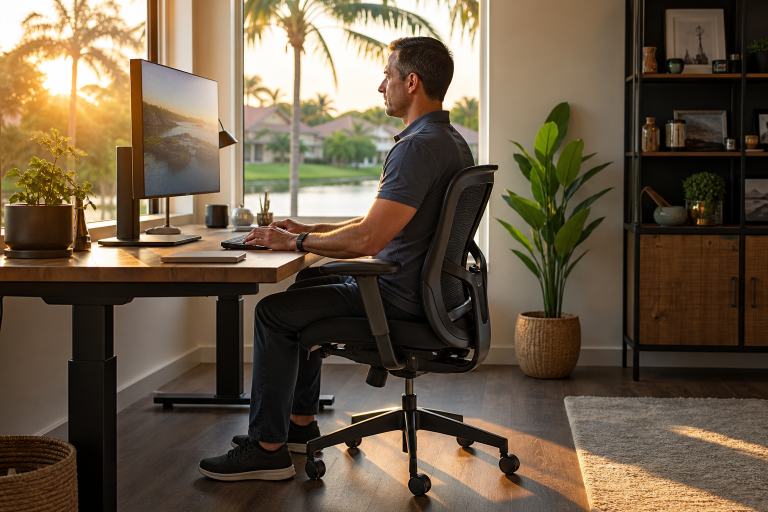
Whether working from a home office in Cooper City or driving between appointments in Broward County, aim for supported, relaxed sitting. Start with these basics:
- Keep both feet supported on the floor or a stable footrest.
- Rest the lower back against the chair rather than perching at the edge.
- Let the shoulders drop instead of holding them close to the ears.
- Keep the head generally balanced over the shoulders.
- Avoid creeping closer to the screen as the day goes on.
- Change positions regularly instead of trying to sit perfectly still.
A comfortable posture is more useful than a rigid one. Even a well-positioned chair can become uncomfortable if the body stays there for too long.
Set Up a More Comfortable Workstation
A few small changes may reduce the need to reach, lean, squint, or crane the neck. Place the monitor directly in front of you, near eye level, and roughly an arm’s length away. If raising a laptop screen, add an external keyboard and mouse so the hands do not have to work too high. Keep commonly used items close, adjust the chair for comfortable hips and knees, and reduce glare that encourages forward leaning.
The National Institutes of Health offers practical guidance on monitor placement, chair adjustment, and keyboard positioning to help workers tailor a desk setup to their bodies and tasks.
Use Movement Breaks That Fit Real Life
Movement breaks do not have to be elaborate workouts. A two-to-five-minute reset can be easier to repeat than waiting for one long exercise session after a busy day. Try walking to refill water, standing during a phone call, rolling the shoulders slowly, taking a few calm breaths, or looking away from the screen while gently resetting the head and neck position.
Alternating among sitting, standing, and walking is generally more practical than choosing one position for the entire day. If possible, use natural transition points, such as the end of a video call, the completion of a task, or a scheduled reminder, as prompts to move.
Protect the Neck During Screen Use
Small screens are convenient, but extended downward viewing can make the neck feel tired. Raise phones and tablets closer to eye level when practical. Keep the chin gently drawn back rather than jutting forward, avoid pinning a phone between the ear and shoulder, and consider voice controls, headphones, or a stand during longer calls and videos.
Screen use does not need to be eliminated. The useful habit is to break up uninterrupted forward bending and give the eyes, neck, and shoulders regular chances to reset.
Lift, Carry, and Move With More Control
Florida weekends often mean moving patio furniture, garden supplies, sports gear, or storm-preparation items. Before lifting, pause and plan:
- Test the object’s weight and size first.
- Move close to the load and keep it near the body.
- Bend through the hips and knees as needed.
- Brace gently without holding your breath.
- Lift smoothly instead of jerking upward.
- Turn with the feet rather than twisting through the spine.
- Use a cart, divide the load, or ask for help with bulky items.
These choices address the force, repetition, awkward posture, and twisting described in ergonomic risk factors for work-related muscle and joint strain.
Support Recovery After Activity
Consider the person who spends weekdays at a desk, then tackles lawn work and heavy outdoor chores on Saturday. A sudden burst of unfamiliar activity can feel harder than steady conditioning. Build activity gradually, take breaks in hot weather, drink water, eat regular meals, and allow recovery after demanding exercise or physical work. Gentle movement may feel better than complete inactivity when stiffness is the main issue, but intense activity should not resume too quickly after an injury.
Simple Daily Mobility Routine
This general routine is not a treatment plan. Keep every movement slow, comfortable, and within an easy range.
- Morning: Take a brief walk and perform relaxed shoulder rolls.
- Workday: Stand, walk, or change position every 30 to 60 minutes when your tasks allow.
- Screen breaks: Gently move the neck through a comfortable range without forcing a stretch.
- Evening: Use light stretching after prolonged sitting, driving, or activity.
- Weekly: Choose enjoyable movement, such as walking, swimming, cycling, or strength training, and increase gradually.
When Back or Neck Pain Needs More Attention
Do not rely on stretching alone when pain is severe, sudden, or getting worse. Seek prompt medical evaluation if symptoms follow a fall, vehicle collision, or other significant injury, or if pain travels into an arm or leg. Numbness, tingling, weakness, fever, unexplained weight loss, unusual fatigue, or pain that disrupts sleep and daily tasks also warrant professional guidance.
Loss of bladder or bowel control with back pain is an emergency symptom. Seek emergency care immediately.
Common Questions
Can good posture prevent all back pain?
No. Posture is one part of overall back health, alongside movement, strength, recovery, injury history, work demands, and medical factors.
Is standing all day better than sitting?
Not necessarily. Both can become tiring when held for hours. Regularly changing position is a more balanced goal.
Should you stretch when your back hurts?
Gentle movement may be appropriate when it feels safe and comfortable. Stop if pain becomes sharp, spreads, or causes numbness or weakness.
A Practical Cooper City Checklist
- Raise the screen and bring the phone higher.
- Support the lower back and relax the shoulders.
- Move regularly during work, driving, and screen time.
- Keep loads close and turn with the feet.
- Build strength and activity in gradual steps.
- Take persistent or concerning symptoms seriously.
Healthy back and neck habits do not need to be complicated. Consistent movement, a more comfortable workstation, controlled lifting, and sensible recovery can support everyday comfort in Cooper City. When symptoms persist, spread, or follow an injury, a qualified health professional can help determine the safest next step.

1 Comment
Pingback: Everyday Health Risks You Should Know About and How to Prevent Them - picrew.org